MCP Apps Explained: Architecture, Client Support and Security
Understand MCP Apps with architecture diagrams, a client support table, security boundaries and fallback guidance. Includes dated sources and data downloads.
Version and test detailsThis guide freezes the stable MCP Apps extension at 2026-01-26, the reviewed ext-apps SDK at v1.7.5, and MCP core at 2026-07-28. Product support was rechecked August 26, 2026.
On this page
Version verifiedChecked August 26, 2026 against MCP Apps 2026-01-26, ext-apps SDK v1.7.5, and MCP core 2026-07-28. Review method.
Five-step lifecycle
An MCP App remains an ordinary tool flow with an optional, host-controlled interface layered onto it.
- Tool identifies UIThe server's tool metadata associates the operation with a ui:// resource for compatible hosts.Read the deep section →
- Host fetches resourceThe host retrieves the declared UI resource through MCP and decides whether it supports the extension.Read the deep section →
- Host creates sandboxA compatible host renders the View inside its sandbox and applies its own browser and permission controls.Read the deep section →
- View exchanges messagesThe View and host use the extension bridge separately from the core client-to-server MCP connection.Read the deep section →
- Host mediates follow-upApp-initiated tool requests return through host policy and server authorization before anything executes.Read the deep section →
MCP Apps: the short answer
MCP Apps is an optional official extension that lets an MCP server associate a tool with an interactive user interface rendered inside a compatible AI host. The server publishes an ordinary MCP tool and a separate UI resource, usually identified by a ui:// URI. The tool points to that resource through _meta.ui.resourceUri. When the host supports the extension, it retrieves the HTML document, places it inside a sandboxed View, and connects that View to a host-controlled JSON-RPC bridge. [S390][S136]
This description contains four distinctions that prevent most conceptual errors.
First, the tool is not the UI. The tool remains the operation: retrieve a report, open a document, calculate a route, update a record or inspect a build. The UI resource describes how a compatible host may present and extend the interaction. Second, the View is not the server. The server may run locally or remotely and can call APIs, databases, filesystems or other services. The View is frontend code executed in the host’s isolated container. Third, the View is not the host. It cannot assume access to the host’s DOM, cookies, model or unrestricted tools. Fourth, the App is not the model. The host owns model execution and decides which information or capabilities reach it. [S390][S393]
The extension became stable on January 26, 2026, after a public proposal on November 21, 2025. The stable specification is SEP-1865 and uses the extension identifier io.modelcontextprotocol/ui. The initial supported content type is HTML with the media type text/html;profile=mcp-app. [S388][S059][S390]
The central design principle is progressive enhancement. A tool should remain useful in a host that does not understand MCP Apps. In an Apps-capable host, the same tool can add a map, chart, form, document viewer, board or other direct-manipulation interface. The protocol therefore adds a new presentation and interaction layer without requiring every MCP implementation to become a browser-like application platform. [S390][S393]
Looking for an MCP app or app store? This guide covers the MCP Apps extension: an interactive interface attached to a tool and displayed inside a compatible host. An application that connects to MCP servers does not necessarily support that extension, and an integration directory is a different thing. For applications that can connect to servers, use the host compatibility matrix. For a tool without an embedded interface, start with building an MCP server.
The practical test is simple: if a tool is still useful as text or structured data but a compatible host can make the same result easier to inspect, compare, configure, or edit through an embedded interface, MCP Apps may fit. It does not turn the server into a browser, replace the tool, or grant the View the host’s authority. If those roles are unfamiliar, start with what an MCP server is and the client, server, and host boundary; use the protocol-version guide when implementing more than one MCP revision.
Start with the client support table, review the security boundaries, or use the production decision guide to assess your use case.
Minimal MCP Apps quickstart
This protocol-shaped quickstart is pinned to the stable MCP Apps extension 2026-01-26 and core MCP 2026-07-28. SDK helper names can change, so the durable contract below is the relationship between the tool, UI resource, fallback result, and host bridge—not a promise that one framework snippet works unchanged in every release.
1. Publish an ordinary tool that points to a UI resource
The tool remains callable without a rendered App. Its metadata associates the operation with a separately readable ui:// resource:
{
  "name": "inspect_orders",
  "description": "Inspect recent orders without changing them",
  "inputSchema": {
    "type": "object",
    "properties": {
      "customer_id": { "type": "string" }
    },
    "required": ["customer_id"],
    "additionalProperties": false
  },
  "_meta": {
    "ui": { "resourceUri": "ui://orders/inspector" }
  }
}
2. Return the linked HTML resource
When the host reads ui://orders/inspector, return a complete, small HTML document with the stable Apps media type. Bundle the first render where practical and declare only the network destinations the interaction actually needs.
{
  "uri": "ui://orders/inspector",
  "mimeType": "text/html;profile=mcp-app",
  "text": "<!doctype html><html>...</html>"
}
3. Make the tool result useful without the View
Return a concise content fallback and the structured fields the View needs. Do not make rendering support a prerequisite for understanding the result.
{
  "content": [{
    "type": "text",
    "text": "Found 3 recent orders for customer cust_123. No changes were made."
  }],
  "structuredContent": {
    "customer_id": "cust_123",
    "orders": [
      { "id": "ord_1001", "status": "shipped" }
    ]
  }
}
4. Validate the smallest complete path
Before expanding the interface, verify one non-rendering host fallback and one compatible host render. Check ui/initialize, duplicate View instances, teardown, a denied App-initiated tool call, malformed result data, keyboard-only operation, and a blocked external connection. Record the exact extension, SDK, host, and core MCP versions with the result. [S390] [S136] [S123] [S433]
If this four-step path does not work, stop before adding fullscreen modes, browser permissions, polling, or host-specific extensions. The failing boundary will be easier to identify while the App has one tool, one resource, and one result shape.
Architecture: server, host, tool, resource, and View
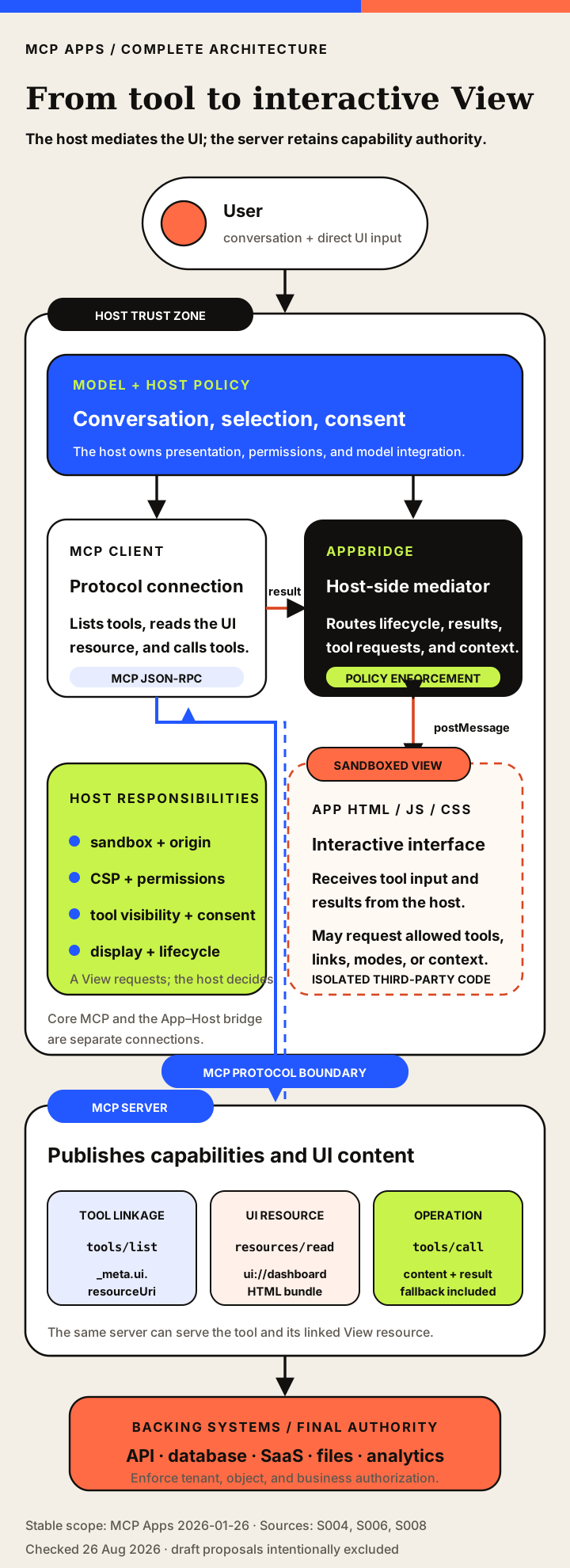
The five roles that matter
An MCP server implements the server side of MCP and exposes tools, resources, prompts or extensions. It may serve the UI document and execute the tool that generated the result. It does not thereby become the rendered application.
An MCP host is the user-facing AI application or environment. It controls the model, conversation, server connections, permissions, rendering policy and result presentation. In MCP Apps, the host also creates the isolated View and mediates its requests.
The stable specification commonly uses View for the rendered user-interface instance. A View is the HTML/JavaScript application executing inside the host’s sandbox. One UI resource may produce several View instances in the same conversation.
The term MCP App is usefully understood as the complete interactive pattern: tool, UI resource, host rendering and App–Host protocol. In ordinary usage, people may use it to mean the View itself, but technical writing should identify the exact component when authority or lifecycle matters.
AppBridge is the host-side SDK abstraction that proxies messages to and from the View, applies host policy and supplies host context. App is the View-side SDK abstraction. PostMessageTransport carries JSON-RPC messages between them in web hosts. [S398][S399][S400]
User
  ↓
AI Host
  ├── model and conversation
  ├── MCP client connection
  ├── permission and policy layer
  ├── AppBridge / message router
  └── sandboxed View
          ↑   ↓ JSON-RPC over postMessage
          MCP App HTML/JavaScript

MCP client
  ↓ core MCP
MCP Server
  ├── tool definition
  ├── ui:// resource
  ├── app-only helper tools
  └── underlying API, database, filesystem or service
The server-to-host path uses ordinary MCP. The View-to-host path uses the Apps extension protocol. When the View requests tools/call or resources/read, the host proxies an allowed request through the relevant MCP client connection. This architecture deliberately places the host between executable third-party UI code and external capabilities. [S390][S136][S393]
| Component | Primary responsibility | Trust boundary | Typical data |
|---|---|---|---|
| User | Interacts with the embedded interface and conversation | Human intent and informed consent | Selections, form input, approvals |
| MCP Host | Runs the conversation, model integration, policy, permissions and app container | Trusted product boundary | Conversation, host context, tool definitions, authorization state |
| MCP Client | Communicates with the MCP server | Protocol boundary | tools/call, resources/read, results and errors |
| MCP Server | Publishes tools and UI resources; executes or delegates operations | External code/service boundary | Tool schemas, HTML bundle, structuredContent, application data |
| UI Resource | Supplies the View HTML/JavaScript/CSS | Untrusted active content | text/html;profile=mcp-app and _meta.ui policy |
| Sandbox Proxy | Provides an isolated web origin for web hosts when used | Host-enforced browser isolation | Sandbox-ready and resource-ready notifications |
| View / iframe | Renders the interface and handles direct user interaction | Sandboxed third-party execution | Tool input/result, local UI state, postMessage JSON-RPC |
| AppBridge | Mediates View-to-Host communication and tool proxies | Host-side policy enforcement | ui/* methods, tools/call, resources/read |
| Underlying system | Enforces final business permissions and stores data | API/database/SaaS security boundary | Records, files, transactions, analytics |
The boundary is not merely organizational. It determines which component can make each security decision. The host can decide whether the user intended to trigger an action. The server decides whether the authenticated caller is authorized to act on a particular record. The View can present a confirmation button, but that button cannot confer permission in the target system. A secure design preserves each control rather than treating the iframe as trusted because it came from the same server. [S390][S410]
How an ordinary tool gains an optional interface
The stable linkage is deliberately small. A tool definition includes normal MCP fields plus UI metadata:
{
  "name": "visualize_sales",
  "description": "Load regional sales data and display an interactive dashboard",
  "inputSchema": {
    "type": "object",
    "properties": {
      "period": { "type": "string" }
    },
    "required": ["period"]
  },
  "_meta": {
    "ui": {
      "resourceUri": "ui://sales/dashboard",
      "visibility": ["model", "app"]
    }
  }
}
The resourceUri points to an MCP resource. The server responds to resources/read with an HTML document whose MIME type is text/html;profile=mcp-app:
{
  "contents": [{
    "uri": "ui://sales/dashboard",
    "mimeType": "text/html;profile=mcp-app",
    "text": "<!doctype html><html>...</html>",
    "_meta": {
      "ui": {
        "prefersBorder": true,
        "csp": {
          "connectDomains": ["https://api.example.com"],
          "resourceDomains": ["https://cdn.example.com"]
        }
      }
    }
  }]
}
A compatible host may discover the linkage before tool execution, prefetch or cache the resource, examine its metadata and prepare the rendering environment. After the tool runs, the host delivers the input and result to the View. In a host without Apps support, the tool remains an ordinary MCP tool and its text or structured result becomes the user-facing output. [S390]
The nested _meta.ui.resourceUri form is the stable recommended shape. Early flat metadata forms appeared during development and should not be copied from old examples without checking the stable specification. The same principle applies throughout this topic: current SDK snippets can change more rapidly than the stable extension semantics.
Tools carry the operation; resources carry the interface
The linkage is intentionally narrow. A normal tool advertises _meta.ui.resourceUri. That URI points to a separately readable ui:// resource whose stable media type is text/html;profile=mcp-app. The host can inspect and cache the interface independently from any one invocation. After the tool runs, the View receives input and result data through the host bridge rather than by becoming the MCP server itself. [S390] [S136] [S124]
The separation also creates a useful data contract. content is the model- and user-readable fallback. structuredContent carries data well suited to UI rendering without requiring every value to enter the model prompt. Result _meta can carry implementation information not ordinarily intended for model context, but it is not a safe place for secrets unless the View is independently authorized to receive them. [S390] [S123]
MCP’s tools, resources, and prompts remain distinct primitives; Apps compose a tool with a UI resource rather than replacing those primitives. The tools, resources, and prompts guide covers that selection in depth. Model function calling is another adjacent layer: it can help a host select and structure a tool invocation, while MCP defines the reusable server boundary and Apps defines the optional embedded UI. See MCP vs function calling for that distinction.
| Field | Location | Meaning | Stable guidance | Sources |
|---|---|---|---|---|
| uri | UI resource | Unique UI resource identifier | Must use ui:// scheme. | [S390] |
| mimeType | UI resource contents | MCP App HTML media type | Must be text/html;profile=mcp-app in stable MVP. | [S390] |
| text or blob | resources/read result | HTML document bytes | Valid HTML5; full document is currently buffered. | [S390] [S453] |
| _meta.ui.resourceUri | Tool definition | Links a tool to its UI resource | Current recommended nested metadata form. | [S390] [S136] |
| _meta.ui.visibility | Tool definition | Controls model and/or app visibility | Defaults to model and app; app-only tools stay hidden from model. | [S390] |
| structuredContent | Tool result | Data optimized for UI rendering | Stable spec recommends keeping it out of model context. | [S390] [S123] |
| content | Tool result | Text/media fallback for model and non-App hosts | Should remain useful without UI. | [S390] [S123] |
| _meta | Tool result | Additional data not intended for model context | Avoid secrets unless the View is authorized to receive them. | [S390] |
Stable UI resources are fully buffered HTML documents; streaming remains a proposal. Keep the shell small and move large or changing data through explicit tool or resource requests. Framework choice is not part of the interoperability contract. [S389] [S390] [S453]
Lifecycle, capability negotiation, and progressive enhancement
Separate the core connection from the View–Host bridge
The stable Apps specification was written against the handshake-era core, where client and server extension support appeared in their initialize capabilities. MCP core 2026-07-28 removed that core handshake: client information and capabilities now travel in request metadata, and a server exposes supported versions and capabilities through server/discover. Servers must implement server/discover; calling it as a client preflight is optional. A client may instead invoke another RPC and handle an unsupported-version response. [S390] [S164] [S054] [S058] [S127]
None of that removes the separate View–Host startup. The embedded View still begins its Apps-dialect relationship with ui/initialize. Core capability negotiation and View initialization happen across different boundaries, with different participants and transports.
The stable lifecycle can be summarized as follows:
1. Host identifies a tool linked to a ui:// resource.
2. Host reads the UI resource and creates a sandboxed View.
3. View sends ui/initialize.
4. Host returns negotiated App protocol information and host context.
5. View sends ui/notifications/initialized.
6. Host delivers tool input, partial input and/or tool result.
7. View renders and handles user interaction.
8. View may request tools, resources, links, messages, context or a display mode.
9. Host mediates each request.
10. Host sends ui/resource-teardown before destroying the View where possible.
The extension-local initialization gives the View information about host capabilities and context. It may learn the theme, locale, viewport, safe-area information, supported display modes and other host-defined values. The host can later send partial context changes. The View must tolerate missing fields because clients differ and future versions may add capabilities. [S390][S393][S408]
The core MCP lifecycle surrounding the server connection is a separate matter. Under current core MCP, requests are self-describing and there is no protocol-level session established by the old initialize method. A modern host can still render an App and conduct the View–Host ui/initialize exchange because the exchange occurs inside the extension and over a different transport. [S390][S054]
| Method/notification | Direction | Stable status | Purpose | Security/policy note | Sources |
|---|---|---|---|---|---|
| ui/initialize | View → Host | Stable | Negotiate App–Host protocol version, app capabilities and receive host context | Not the removed core MCP initialize handshake. This lifecycle is extension-local. | [S390] [S393] |
| ui/notifications/initialized | View → Host | Stable | Signal that View initialization is complete | Host should not send normal View traffic before readiness. | [S390] |
| ui/notifications/tool-input-partial | Host → View | Stable optional | Provide progressively assembled tool arguments | App must not rely on partial arguments for critical operations. | [S390] |
| ui/notifications/tool-input | Host → View | Stable | Provide complete tool arguments | Treat as untrusted input and validate before rendering. | [S390] |
| ui/notifications/tool-result | Host → View | Stable | Deliver MCP CallToolResult to the View | Tool output can contain untrusted or injected content. | [S390] |
| ui/notifications/tool-cancelled | Host → View | Stable | Notify the View that the associated call was cancelled | UI should preserve a recoverable state and announce cancellation accessibly. | [S390] |
| tools/call | View → Host → MCP Server | Stable shared MCP method | Request an app-permitted tool invocation | Host and server both retain authorization responsibilities. | [S390] [S123] |
| resources/read | View → Host → MCP Server | Stable shared MCP method | Read an MCP resource through the host proxy | Host may restrict URI access; server enforces resource authorization. | [S390] [S124] |
| ui/open-link | View → Host | Stable | Ask host to open an external URL | Host validates scheme, destination and user policy. | [S390] |
| ui/message | View → Host | Stable | Submit message content into the host conversation | Host may request consent and should show provenance. | [S390] |
| ui/update-model-context | View → Host | Stable | Replace app-supplied model context for future turns | Scope multiple View instances and avoid silent cross-instance overwrite. | [S390] [S452] |
| ui/request-display-mode | View → Host | Stable | Request inline, fullscreen or picture-in-picture | Host retains final control and may decline. | [S390] |
| notifications/message | View → Host | Stable shared MCP notification | Send log or telemetry message | Avoid secrets and sensitive user data in logs. | [S390] |
| ui/notifications/size-changed | View → Host | Stable | Notify host of preferred dimensions | Host should prevent layout abuse and excessive resizing. | [S390] [S393] |
| ui/notifications/host-context-changed | Host → View | Stable | Update theme, locale, display mode, dimensions and related host context | App must handle missing fields and host-specific variation. | [S390] [S393] |
| ui/notifications/sandbox-proxy-ready | Sandbox Proxy → Host | Stable web-host pattern | Signal proxy readiness | Host must validate message source window. | [S390] [S437] |
| ui/notifications/sandbox-resource-ready | Host → Sandbox Proxy | Stable web-host pattern | Deliver HTML to the isolated proxy | Apply sandbox and CSP before execution. | [S390] [S395] |
| ui/resource-teardown | Host → View | Stable | Request graceful cleanup before destroying the View | App should release timers, streams and sensitive state. | [S390] |
| App-provided tools/list and tools/call | Host ↔ View | Draft only | Let a View declare ephemeral tools to the host | Do not present as stable; negotiation and provenance remain active design work. | [S391] [S455] |
The method register demonstrates why “MCP Apps is just an iframe” is insufficient. The View has a constrained, typed communication surface. It cannot simply reach into the host application. Requests such as ui/open-link, ui/message, ui/update-model-context and ui/request-display-mode allow the host to approve, deny, transform or audit the operation.
Input, results, and model context
The host can deliver partial tool input while a model is still constructing arguments, followed by complete input and the final result. Partial input enables early rendering—a map can initialize before every filter is available, or a form can display fields while values arrive—but it must never be treated as authoritative for an irreversible operation. The complete tool invocation and server-side validation remain the source of truth. [S390][S397]
A tool result can carry three conceptually different classes of information:
content: model- and user-readable fallback content;structuredContent: structured data suitable for UI rendering or downstream processing;_meta: implementation metadata not ordinarily intended for model context.
The stable Apps specification encourages Apps to use structured data for rendering while preserving concise fallback content. This can reduce context-window consumption: thousands of chart points need not be inserted into the model prompt merely because the user can inspect them. It does not eliminate token costs. Text fallbacks, context updates and follow-up model turns still consume context, and hosts may choose different policies. [S390][S123]
Tool output is untrusted input from the View’s perspective. A compromised upstream service can return hostile strings, URLs or markup-like content. Apps should use safe DOM APIs, avoid unsanitized innerHTML, constrain external navigation and distinguish server-provided data from executable code. The host sandbox protects the host page; it does not prevent the App from deceiving its own user or asking for an unsafe follow-up action.
App-initiated calls and visibility
A View may request tools/call through the host. The host enforces App visibility and product policy; the server still validates arguments, authorization, rate limits, and business rules. _meta.ui.visibility separates model-visible and App-callable tools. App-only helpers can support refresh, pagination, or detail loading without filling the model’s tool catalog, but “hidden from the model” never means “safe without authorization.” [S390] [S123]
App-provided ephemeral tools reverse that direction by letting a View publish tools to the host. They remain draft work with unresolved negotiation and provenance questions, so production guidance must not present them as stable. [S391] [S455]
Fallback is part of the design, not an afterthought
A robust MCP App begins with the non-UI result. The server asks: what would this tool return in a terminal client, a host without Apps support or an automated workflow? That answer becomes the fallback. The App adds direct manipulation, visual structure or richer state without making the underlying capability exclusive to one client.
| Host condition | Expected behavior | Server requirement | User consequence | Sources |
|---|---|---|---|---|
| Supports core MCP only | Run the tool and display content/structuredContent without rendering the UI resource | Return a useful non-UI fallback | Task remains possible, but without direct manipulation | [S390] [S136] [S393] |
| Supports MCP Apps extension | Fetch referenced ui:// resource, render the View, deliver tool input/result and retain fallback content | Advertise extension and link tool metadata correctly | Interactive workflow inside the host | [S390] [S136] |
| Supports Apps but not requested display mode | Decline or retain an allowed mode | Do not assume fullscreen or PiP | UI remains available in a supported mode | [S390] [S406] |
| Blocks a requested permission | Render without that browser feature | Feature-detect and provide an alternate path | Reduced functionality rather than silent failure | [S390] [S442] |
| Cannot load a declared external origin | CSP/CORS error or blocked request | Bundle assets or declare and configure origins accurately | App may partially render; fallback remains important | [S395] |
| Does not implement draft app-provided tools | Ignore or reject draft feature | Keep stable server tools as the interoperable path | No loss of core stable functionality | [S391] [S455] |
This model improves portability and failure recovery. A host may support Apps but decline an external origin, permission or display mode. A mobile host may render only a subset of features. A user may disable interactive connectors. The text or structured result should preserve the core outcome even when the interface cannot load.
Progressive enhancement also disciplines product design. When a server cannot describe a useful non-UI result, it may be trying to squeeze a full standalone product into a conversational container. In that case, a secure external link or conventional application may provide a better experience.
Progressive enhancement is also the strongest portability strategy. Design the tool result first, add the stable UI bridge second, and isolate host-specific polish behind capability checks. A host may decline fullscreen, browser permissions, external links, or individual app-initiated tools while still rendering a useful View.
Security: sandbox the View, mediate actions, authorize at the server
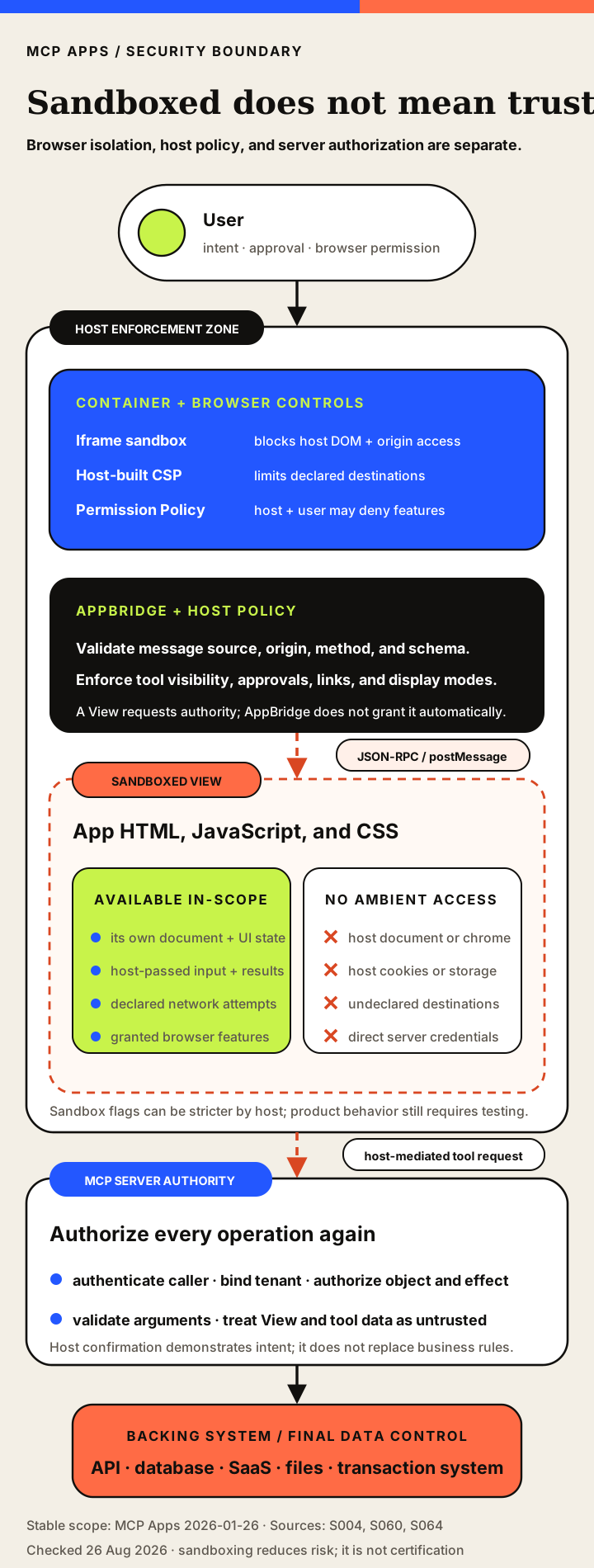
MCP Apps deliberately executes server-provided frontend code inside another application. That is a meaningful supply-chain and interaction boundary. The stable specification responds with sandboxing, CSP declarations, host mediation and an auditable JSON-RPC bridge. Those controls reduce the View’s access to the host and make sensitive operations visible at a policy boundary. [S390]
They do not solve every security problem. The server package can be malicious. The UI bundle can contain compromised dependencies. The View can present a phishing interface. Tool results can contain prompt injection or deceptive data. An App can request an excessive permission or repeatedly call a high-authority helper tool. A host can implement the sandbox incorrectly. An upstream API can apply the wrong tenant authorization.
| Threat | Affected layer | Attack path | Impact | Primary mitigations | Sources |
|---|---|---|---|---|---|
| Malicious UI bundle | UI resource/server | Server returns deceptive or hostile HTML/JS | Phishing, exfiltration attempts, unsafe tool requests | Sandbox, CSP, trusted publishers, host review, app-specific policy | [S390] [S410] [S440] |
| Sandbox escape | Browser/host | Browser or host isolation weakness | Parent DOM, cookie or account compromise | Minimal sandbox flags, patching, origin isolation, defense in depth | [S390] [S436] |
| postMessage spoofing | AppBridge/View | Accept messages from wrong source window or origin | Unauthorized requests or data injection | Validate source, origin and schema; avoid wildcard trust | [S437] [S440] |
| Tool-call abuse | Host/server | App requests high-authority tools | Data modification or external action | Visibility enforcement, allowlists, confirmation, server authorization | [S390] [S140] |
| Model-context poisoning | View/host/model | App sends misleading ui/update-model-context | Future model behavior manipulated | Provenance, user visibility, scope by View instance, sanitization | [S390] [S452] |
| Prompt injection in tool result | External data/View/model | Untrusted structuredContent or content | Unsafe downstream model/tool behavior | Treat data as untrusted, isolate rendering, host policy | [S123] |
| CSP under-declaration | App configuration | Required domains omitted | Blank or partially working interface | Test against real hosts, validator, diagnostics | [S395] [S448] |
| CSP over-declaration | App configuration | Broad domain allowlists | Exfiltration and supply-chain exposure | Least-privilege domains and local bundling | [S395] [S441] |
| CORS mismatch | External API | API does not allow sandbox origin | Network request fails despite CSP | Dedicated domain and correct API CORS policy | [S395] [S439] |
| Nested-frame abuse | View/third party | App embeds an untrusted site | Clickjacking, tracking, confusing nested consent | Strict frameDomains, host policy, avoid unnecessary frames | [S456] |
| UI spoofing of host controls | View UX | App imitates host confirmation or account UI | Phishing and mistaken consent | Host chrome, visual boundaries, design review, clear provenance | [S390] [S136] |
| App-only tool exposure to model | Host implementation | Host ignores visibility metadata | Model invokes implementation-only operations | Conformance tests and tool filtering | [S390] [S446] |
| Model-only tool exposure to app | Host implementation | Host proxies app tools/call without visibility check | Privilege expansion | Reject unauthorized app calls and log provenance | [S390] [S451] |
| Cross-instance context collision | Host state | Same ui:// resource rendered multiple times shares one context slot | Wrong instance influences next model turn | Instance IDs and scoped state | [S452] |
| Resource update/supply-chain compromise | Package/CDN | App bundle or dependency changes after review | Previously approved UI becomes hostile | Pin hashes/versions, review changes, bundle dependencies | [S402] [S140] |
| Sensitive logs | Telemetry | App sends secrets through notifications/message | Credential or data leakage | Redaction and logging policy | [S390] |
| Unbounded resizing | Host layout | Repeated size-changed notifications | Denial of UI, layout instability | Host limits and throttling | [S390] |
| External link abuse | View/host | ui/open-link to deceptive or dangerous URL | Phishing or unsafe navigation | Scheme/domain validation and user notice | [S390] |
| Permission overreach | Browser permissions | App requests camera/mic/location unnecessarily | Privacy loss | Deny by default, explicit user permission, feature detection | [S390] [S442] |
| Host divergence | Ecosystem | Different hosts implement different subsets or interpretations | Broken apps and inconsistent security | Public tests, canonical validator, per-host testing | [S445] [S446] |
A practical threat model should ask five questions:
- Who authored the executable UI? Provenance remains an active project concern. [S451]
- What can the View reach? CSP, Permission Policy and the host bridge define the immediate browser surface.
- What can the server do? Tool scopes, upstream credentials and business authorization define real-world authority.
- What enters the model? Fallback content and model-context updates can influence future actions.
- What is logged? Host and server logs can aid audit but can also leak tool input, results or user data.
The strongest architecture treats the App as untrusted-but-useful presentation code. It receives only the data it needs, requests only the tools it needs, cannot bypass the host’s policy and cannot bypass the server’s authorization.
Browser controls are layered controls
The stable web-host pattern uses a sandboxed iframe, sometimes behind an intermediate sandbox proxy. The host must validate the source window, message schema, protocol version, and allowed method for every postMessage exchange. A permissive message listener or an overpowered combination of iframe flags can erase the boundary even when the product describes the View as “sandboxed.” [S390] [S436] [S437]
CSP and CORS solve different problems. The UI resource declares connectDomains, resourceDomains, frameDomains, and related policy inputs; the host may make the resulting CSP stricter. CORS is decided by the remote API’s response. Adding an API to connectDomains does not make that API accept the App’s assigned origin. Bundle assets and deny external connections by default unless the interaction genuinely needs them. [S390] [S395] [S439] [S441] [S456]
Diagnose TomTom and other browser API failures without guessing
When an embedded map or another browser API fails, do not begin by adding a wildcard origin or disabling the sandbox. Capture the browser console error, failed request URL without credentials, response status, response Access-Control-Allow-Origin, effective CSP, assigned App origin, host and plan, and whether the same request succeeds from a normal page.
Use the evidence to classify the boundary:
| Observed signal | Likely owner | Safe next check |
|---|---|---|
| Browser reports a CSP refusal before the request is sent | App metadata or host policy | Confirm the destination is necessary and declared in connectDomains; inspect the host's effective policy. |
| Request is sent but the response lacks an allowed origin | Remote API CORS policy | Use the provider's documented browser-origin configuration or move the request behind an authenticated server tool. |
| Host does not render the View or exposes no Apps bridge | Host capability or product surface | Recheck the dated support matrix and preserve the plain tool-result fallback. |
| Direct browser test works but the embedded View fails | Sandbox, assigned origin, or host mediation | Compare origins, iframe permissions, message source validation, and host-specific restrictions. |
| Server-side tool call fails too | Credentials, quota, endpoint, or provider API | Debug the backing API independently from Apps rendering. |
For TomTom specifically, publish a named fix only after reproducing the exact product, host, endpoint, and error. A query string that resembles an error is not evidence that every failure is CORS, and permissive origins are not a safe universal remedy.
Camera, microphone, geolocation, and clipboard-write metadata are requests, not grants. Host policy, iframe Permission Policy, browser state, and the user’s choice all remain in the path, so every privileged feature needs detection and a fallback. Most importantly, host confirmation records user intent at the host layer; the MCP server and backing system must still enforce tenant, object, and business authorization. [S390] [S145] [S431] [S442] [S457]
For the broader protocol threat model—including confused deputy risk, prompt injection, OAuth boundaries, and server trust—use the dedicated MCP security guide.
Client support and adjacent UI ecosystems
MCP Apps is optional, so generic MCP support does not prove rendering support. This is a dated product snapshot, not a permanent compatibility promise. Test the exact product, plan, platform, and action path you intend to ship.
| Client or host | Apps rendering | Display modes | App-initiated actions | Mobile status | Checked | Sources |
|---|---|---|---|---|---|---|
| Claude web | Documented | Inline and fullscreen documented | Supported subject to host policy | Current help says interactive connectors available | 2026-08-26 | [S420] |
| Claude Desktop | Documented | Inline and fullscreen documented | Supported subject to host policy | Desktop only for this product | 2026-08-26 | [S059] [S420] [S145] |
| Claude iOS/Android | Documented in current help | Product behavior may differ | Connector permissions apply | Yes | 2026-08-26 | [S420] [S258] |
| ChatGPT web | Documented beta | Interactive UI supported; exact extension parity host-specific | Write/modify actions supported for eligible plans with controls | No for custom MCP apps in current developer-mode FAQ | 2026-08-26 | [S415] [S416] [S140] |
| VS Code GitHub Copilot | Documented support; current setting labeled Experimental | Host-specific editor UI | Supported by implementation | Not applicable | 2026-08-26 | [S143] [S421] [S458] |
| Goose Desktop | Documented | Desktop host-specific | Supported by product integration | No | 2026-08-26 | [S422] [S423] |
| Postman | Documented preview in MCP response pane | Preview pane | Testing behavior depends on server and client mode | No | 2026-08-26 | [S424] |
| MCPJam | Documented emulator | Desktop/tablet/mobile emulation | Full message tracing and widget testing | Emulates mobile, not a consumer mobile host | 2026-08-26 | [S425] |
| Microsoft 365 Copilot | Listed by official MCP overview | Product-specific | Live-check required | Live-check required | 2026-08-26 | [S136] [S392] |
| Archestra.AI | Listed by official MCP overview | Live-check required | Live-check required | Live-check required | 2026-08-26 | [S136] [S392] |
| Cursor | Documented support | Interactive UI views documented; exact mode support is host-specific | MCP Apps supported; individual actions remain subject to host and server policy | No | 2026-08-26 | [S269] |
Two corrections matter. Cursor’s current first-party MCP page explicitly lists the Apps extension as supported and describes interactive UI views returned by tools. VS Code has documented MCP Apps since its January 2026 rollout, while the current chat.mcp.apps.enabled setting remains labeled Experimental and defaults to true. Do not flatten those different evidence states into either “unsupported” or an unqualified promise of permanent parity. [S143] [S421] [S269] [S458]
MCP Apps and MCP-UI
MCP-UI is best understood as important pre-standard implementation work and a current SDK/adapter ecosystem, not as a completely unrelated rival protocol. New work can target the official MCP Apps contract while host libraries preserve legacy formats where necessary.
| Dimension | MCP-UI | MCP Apps | Sources |
|---|---|---|---|
| Historical role | Pre-standard community implementation and experimentation | Official standardized extension | [S388] [S390] [S412] [S413] |
| Current role | SDKs and adapters that implement MCP Apps plus legacy compatibility | Normative protocol and official SDK | [S388] [S390] [S412] [S413] |
| Primary tool linkage | Legacy formats and current _meta.ui.resourceUri | _meta.ui.resourceUri | [S388] [S390] [S412] [S413] |
| View transport | MCP-UI postMessage conventions and adapters | JSON-RPC App protocol over postMessage | [S388] [S390] [S412] [S413] |
| Host SDK | @mcp-ui/client is a production-oriented host renderer | Official repo offers AppBridge/basic-host, not a turnkey host product | [S388] [S390] [S412] [S413] |
| OpenAI compatibility | Current ChatGPT UI builds target MCP Apps; adapters can cover optional ChatGPT-specific extensions such as window.openai. | The open standard is now OpenAI’s baseline for new ChatGPT UI, with product extensions remaining optional. | [S388] [S390] [S412] [S413] [S417] |
| Migration | Adapters can preserve legacy widgets while adopting official metadata | New implementations should target stable Apps spec | [S388] [S390] [S412] [S413] |
| Relationship | Influenced and helped author the standard | Formalized a cross-host baseline | [S388] [S390] [S412] [S413] |
| Same project? | No, but closely related and overlapping contributors | No, official MCP extension project | [S388] [S390] [S412] [S413] |
| Recommended wording | MCP-UI pioneered and now implements MCP Apps | MCP Apps is the standardized extension | [S388] [S390] [S412] [S413] |
OpenAI Apps SDK history and the current Plugins surface
OpenAI’s Apps SDK helped validate MCP-backed conversational interfaces and remains useful historical/product terminology. Current OpenAI guidance is now standards-first for UI: new ChatGPT components use _meta.ui.resourceUri and the MCP Apps ui/* bridge; window.openai is an optional ChatGPT extension for capabilities outside the shared standard. The broader MCP history explains where this extension fits in the protocol’s evolution. [S415] [S416] [S417]
| Dimension | OpenAI product surface | MCP Apps | Sources |
|---|---|---|---|
| Scope | Historical/product terminology within OpenAI’s current Plugins platform; new ChatGPT UI builds use the MCP Apps standard plus optional ChatGPT extensions. | Cross-host MCP extension | [S390] [S415] [S417] |
| Core UI API | MCP Apps ui/* JSON-RPC is the baseline for new ChatGPT UI; window.openai is an optional ChatGPT-specific extension. | JSON-RPC over postMessage through App/AppBridge | [S390] [S415] [S417] |
| Host portability | OpenAI states apps can run where the standard is adopted, but adapters may be needed | Designed for compliant MCP Apps hosts | [S390] [S415] [S417] |
| Tool metadata | _meta.ui.resourceUri and standard MCP Apps metadata, with optional ChatGPT-specific extension fields where needed. | _meta.ui.resourceUri and visibility | [S390] [S415] [S417] |
| Distribution | Plugins Directory and plugin submission workflow; since July 9, 2026, apps remain underlying integrations and new app submissions are packaged in plugins. | Host-specific directories or server installation; general discovery remains open | [S390] [S415] [S417] [S459] |
| Permissions | ChatGPT product controls and workspace governance | Extension defines requests; each host determines policy | [S390] [S415] [S417] |
| Automatic equivalence | No | No; translation and compatibility testing are required | [S390] [S415] [S417] |
Distribution terminology also changed. OpenAI moved discovery from the App directory to the Plugins Directory on July 9, 2026. Apps remain underlying integrations, while plugin listings can package apps, skills, and app templates. That product directory is not a universal public directory for every MCP App or host. [S459]
Frameworks, testing, accessibility, and performance
Framework choice does not change the protocol contract
The View is a web document, so teams can use vanilla JavaScript, framework bundles, Web Components, or the official helpers. Choose in proportion to interaction complexity and bundle cost. Hosts support the Apps bridge; they do not need special knowledge of React, Vue, or any other library.
| Framework | Helper | Best fit | Main risk | Sources |
|---|---|---|---|---|
| Vanilla JavaScript | App class optional | Small bundle, maximum control | Manual state and DOM management | [S389] [S136] |
| React | @modelcontextprotocol/ext-apps/react hooks | Complex component applications and teams already using React | Bundle size and rerender discipline | [S389] [S136] |
| Vue | Core App API | Component-oriented UI with compact ergonomics | Bundle and integration testing | [S389] [S136] |
| Svelte | Core App API | Compiled, lightweight interactive Views | Host browser compatibility and build pipeline | [S389] [S136] |
| Preact | React-like approach | Smaller React-style bundle | Library compatibility assumptions | [S389] [S136] |
| Solid | Core App API | Fine-grained reactivity | Smaller ecosystem and host testing | [S389] [S136] |
| Web Components | Core protocol can be used directly | Framework-neutral components | Accessibility and styling discipline remain developer-owned | [S136] |
| Any web framework | Implement postMessage JSON-RPC directly | Existing frontend codebases | No framework removes security or accessibility duties | [S136] [S393] |
Test the bridge and the product behavior
The official SDK documents a basic host for local testing and recommends verification in real target hosts. Postman and MCPJam provide additional inspection and emulation paths. A useful test strategy has four layers. [S396][S424][S425]
Protocol tests verify ui/initialize, readiness, input/result delivery, request and notification schemas, errors, cancellation and teardown. Security tests verify sandbox attributes, CSP, message source validation, link filtering, denied tools and denied permissions. UX tests verify loading, errors, multiple instances, responsive sizing and display modes. Accessibility tests verify keyboard, focus, announcements, contrast and zoom.
The absence of one canonical conformance validator remains a material gap. Open project issues propose a validator and public platform tests. Until those mature, passing one host’s demo is not proof of interoperability. [S445][S446]
Add negative tests: reject a View call to a model-only tool, deny undeclared origins and unexpected message sources, cancel a running call, mount duplicate instances, and exercise teardown. Repeat critical paths in every production host; the reference host cannot prove product parity.
Accessibility is shared between host and App
The host owns iframe naming, focus entry and return, fullscreen transitions, and surrounding conversation semantics. The App owns its internal HTML semantics, keyboard behavior, focus order, status announcements, chart alternatives, color use, and motion. Neither side can make the complete experience accessible alone. Protocol conformance is not WCAG conformance. [S433] [S434] [S435] [S444]
| Check | Owner | Why it matters | Evidence | Sources |
|---|---|---|---|---|
| Provide an accessible iframe/title name | Host and app | Screen-reader users need to identify the embedded View | WCAG name/role/value and iframe context | [S433] [S444] |
| Full keyboard operation | App | Every control must work without pointer input | WCAG 2.1.1 and APG patterns | [S433] [S434] |
| Visible focus and focus not obscured | Host and app | Embedded/fullscreen chrome can hide focus | WCAG 2.4.7, 2.4.11 | [S433] |
| Return focus on close | Host | Preserves workflow continuity | APG dialog guidance | [S434] |
| Semantic tables/charts and text alternatives | App | Visual data needs nonvisual access | WCAG perceivable requirements | [S433] |
| Announce loading, success, errors and cancellation | App | Dynamic updates otherwise remain invisible to assistive technology | ARIA alert/status patterns | [S435] |
| Respect zoom and magnification | Host and app | Iframe sizing must not clip content | WCAG reflow and zoom | [S433] [S444] |
| Test with screen readers and real hosts | Both | Spec conformance alone cannot prove assistive technology compatibility | Open accessibility issue and W3C testing guidance | [S444] [S433] |
Test with keyboard-only navigation, screen readers, zoom, high contrast, reduced motion, touch target constraints, and every supported display mode. Loading, success, cancellation, and failure must be announced without unexpectedly stealing focus.
Performance and model-context cost need separate budgets
An App can reduce repeated explanatory turns by letting a user manipulate rich data directly, but that benefit is not automatic. A large HTML bundle, slow resources/read, repeated iframe startup, oversized result messages, aggressive polling, or frequent ui/update-model-context calls can cost more than a concise answer.
| Concern | Measure | Mitigation | Status | Sources |
|---|---|---|---|---|
| UI resource bundle size | Compressed/uncompressed bytes; time to first paint | Bundle locally, tree-shake, lazy-load optional features | Implementation | [S389] [S453] |
| Full-buffered HTML | Resource latency and first paint | Small shell, chunk data separately; streaming remains proposal | Stable protocol limitation | [S390] [S453] |
| External assets | Request count, blocked requests, total bytes | Self-contained bundle or tightly controlled CDN | Implementation/security | [S395] |
| Iframe startup | ui/initialize-to-ready duration | Prefetch UI resource, minimize startup work | Host and app | [S390] [S136] |
| Tool-result transfer | Message size and serialization time | Chunk/paginate data; resources/read for large binary data | Application design | [S397] |
| Model-context cost | Tokens added per turn | Keep rich UI data out of model context; send concise summaries | Host/app design | [S390] |
| Live polling | Requests/minute and server load | Backoff, visibility/offscreen pausing, event-driven updates where supported | Application design | [S397] |
| Context savings | Turns/tokens for equivalent task | Use UI only for interactions that benefit from it | Potential benefit; benchmark required | [S136] [S143] |
Record compressed and uncompressed bundle bytes, resource latency, time from iframe creation to initialized, first meaningful paint, message size, app-only calls per interaction, memory per View, model tokens added, and cache hit rate. Treat streamed HTML as a proposal, not a stable optimization. [S390] [S397] [S407] [S453]
Production decision guide
Use an MCP App when direct manipulation, visual structure, or simultaneous controls materially improve a conversation-scoped task. Strong candidates include maps, analytical exploration, document review, configuration with interdependent choices, permission-aware selectors, monitoring, and compact approval workflows. The server must still return a useful fallback, and the UI must not be the only place where authorization or validation occurs.
Prefer plain content or structuredContent when the answer is short, users do not need manipulation, latency dominates presentation, or automated agents are the main consumers. Prefer a conventional web application for long-lived workspaces, deep navigation, collaboration, background notifications, complex account administration, or information that must remain open independently of the conversation.
| Decision question | If yes | If no |
|---|---|---|
| Does the user need to manipulate, compare or inspect structured information? | An App may add material value. | Return text or structuredContent without UI. |
| Will a useful fallback remain available in non-App hosts? | Proceed with progressive enhancement. | Redesign the tool result before relying on Apps. |
| Is the interaction short-lived and conversation-scoped? | A View is a good fit. | Consider linking to a full external application. |
| Does the UI need privileged browser APIs? | Confirm host capability, permission policy and fallback. | Keep requested permissions empty. |
| Can external assets/APIs be bundled or tightly allowlisted? | Declare minimal CSP and configure CORS. | The app may be brittle or unsafe across hosts. |
| Does the App request high-impact tools? | Use host confirmation plus server-side authorization and semantic validation. | Still enforce least privilege. |
| Will users depend on keyboard, screen reader or zoom? | Apply WCAG/APG testing before release. | Accessibility remains required, not optional. |
| Is the same UI expected to work in several hosts? | Test the stable minimum and maintain a capability matrix. | Label product-specific dependencies clearly. |
Before release, freeze the stable behavior you depend on, maintain a product capability matrix, minimize CSP and permissions, document fallback output, assign accessibility ownership, and record the exact target-host test results. Do not market a draft feature, an SDK helper, or one vendor’s product extension as if it were stable cross-host protocol behavior.
Known limits that should influence the decision
| Limitation | Status | Production consequence | Sources |
|---|---|---|---|
| No universal client parity | Current limitation | A server cannot assume the same Apps features in every MCP host. | [S392] [S420] [S143] [S422] [S424] |
| Full-buffered HTML resource | Stable behavior; streaming proposed | Large bundles delay parsing and first paint. | [S390] [S453] |
| No canonical conformance validator | Open proposal | Developers rely on reference hosts and product testing. | [S445] |
| Accessibility requirements not fully normative | Open issue | Protocol compliance does not ensure keyboard/screen-reader usability. | [S444] [S433] |
| View provenance and server identity | Open issue | Hosts and users need to know who authored executable UI. | [S451] |
| Multiple View instance context | Ambiguous/open | One instance can overwrite another instance’s model context. | [S452] |
| Draft app-provided tools | Not stable | Publishing ephemeral tools from a View changes trust and lifecycle assumptions. | [S391] [S455] |
These are design constraints, not categorical rejection criteria. A bounded interface with a strong fallback and explicit host matrix can be production-worthy. Label and govern hidden host dependencies, broad network access, durable browser storage, or high-authority tools as product-specific.
Frequently asked questions
What is an MCP App?
Is MCP Apps part of core MCP?
What is a UI resource?
Does MCP Apps use initialize?
What happens in hosts without MCP Apps support?
Can an App call MCP tools?
Are MCP Apps secure?
How does MCP Apps relate to the OpenAI Apps SDK?
Does ChatGPT support MCP Apps?
Does VS Code support MCP Apps?
Does Cursor support MCP Apps?
Yes. Current official Cursor documentation lists the MCP Apps extension as supported and describes interactive UI views returned by tools. Exact display behavior and action policy remain host-specific. S269
Methodology, integrity, datasets, and complete sources
This guide uses the MCP Apps specification and the host and SDK documentation cited above. Product settings, plans and support can change. The downloadable research manifest records corrections and limitations in the original source material.
Download all 26 MCP Apps datasets in JSON or CSV
- MCP Apps Accessibility Checklist JSON · CSV
- MCP Apps App–Host Method Register JSON · CSV
- MCP Apps vs Web Apps and Plugins JSON · CSV
- MCP Apps Architecture Matrix JSON · CSV
- MCP Apps Case Study Dataset JSON · CSV
- MCP Apps Normalized Claim Register JSON · CSV
- MCP Apps Client Support Matrix JSON · CSV
- MCP Apps CSP and Permissions Matrix JSON · CSV
- MCP Apps Display Mode Matrix JSON · CSV
- MCP Apps FAQ JSON · CSV
- MCP Apps Framework Support Matrix JSON · CSV
- MCP Apps History Timeline JSON · CSV
- MCP Apps Limitations and Open Questions JSON · CSV
- MCP Apps vs MCP-UI JSON · CSV
- MCP Apps Myths and Evidence JSON · CSV
- MCP Apps vs OpenAI Apps SDK and Current Plugins Surface JSON · CSV
- MCP Apps Performance and Context-Cost Framework JSON · CSV
- MCP Apps Production Decision Framework JSON · CSV
- MCP Apps Progressive Enhancement Matrix JSON · CSV
- MCP Apps Responsibility Matrix JSON · CSV
- MCP Apps Security Threat Register JSON · CSV
- MCP Apps State Model Matrix JSON · CSV
- MCP Apps Supporting Content Plan JSON · CSV
- MCP Apps UI Resource Metadata Matrix JSON · CSV
- MCP Apps Visual Specifications JSON · CSV
- MCP Apps Source Usage Audit JSON · CSV
Package integration manifest · Unified content roadmap JSON · Unified content roadmap CSV
Show the complete 86-record canonical evidence register
- S388 — MCP Apps: Extending servers with interactive user interfaces
- S059 — MCP Apps: Bringing UI capabilities to MCP clients
- S389 — modelcontextprotocol/ext-apps
- S390 — SEP-1865: MCP Apps: Interactive User Interfaces for MCP
- S391 — MCP Apps Draft Specification
- S136 — MCP Apps
- S392 — Extension Support Matrix
- S393 — MCP Apps SDK Overview
- S394 — MCP Apps Quickstart
- S395 — CSP and CORS
- S396 — Testing MCP Apps
- S397 — MCP Apps Patterns
- S398 — App Class
- S399 — AppBridge Class
- S400 — PostMessageTransport Class
- S401 — MCP Apps Server Helpers
- S402 — ext-apps v1.7.5
- S403 — ext-apps v1.7.4
- S404 — ext-apps Releases
- S405 — Initial commit of ext-apps
- S406 — Display-mode implementation history
- S407 — PDF viewer and chunked loading implementation
- S408 — Safe-area inset support
- S409 — SEP-1865 Final
- S164 — Extensions Overview
- S054 — MCP specification 2026-07-28
- S123 — Tools
- S124 — Resources
- S125 — MCP Prompts specification
- S410 — ext-apps Security Policy
- S411 — ext-apps License
- S412 — MCP-UI Repository
- S413 — About MCP-UI
- S414 — MCP-UI Client SDK
- S415 — Introducing apps in ChatGPT and the new Apps SDK
- S416 — Build with the Apps SDK
- S140 — Developer mode and MCP apps in ChatGPT
- S417 — Build a ChatGPT UI
- S418 — OpenAI Apps SDK Examples
- S419 — Developers can now submit apps to ChatGPT
- S420 — Use interactive connectors in Claude
- S145 — Get started with custom connectors using remote MCP
- S258 — When to use desktop and web connectors
- S143 — Giving Agents a Visual Voice: MCP Apps Support in VS Code
- S421 — Your Home for Multi-Agent Development
- S422 — Goose Home
- S423 — Auto Visualiser with MCP-UI
- S424 — Interact with an MCP App
- S425 — MCPJam Inspector
- S426 — Interactive Maps
- S427 — TomTom MCP Apps: When Your AI Agent Gets Eyes on the Map
- S428 — Building MCP Apps with Custom Tools
- S429 — Available MCP Apps in the MCP Standard Tools SuiteApp
- S430 — Prompt Library MCP App
- S431 — Record Selector MCP App
- S432 — NetSuite Brings New AI Innovations to Southeast Asia
- S433 — Web Content Accessibility Guidelines 2.2
- S434 — Dialog (Modal) Pattern
- S435 — Alert and Message Dialogs Pattern
- S436 — iframe sandbox attribute
- S437 — Window.postMessage
- S438 — Content Security Policy
- S439 — Cross-Origin Resource Sharing
- S440 — HTML5 Security Cheat Sheet
- S441 — Content Security Policy Cheat Sheet
- S442 — Permissions Policy
- S443 — Content Security Policy Level 3
- S444 — Accessibility
- S445 — Adding an official MCP App validator
- S446 — Set up public MCP Apps platform tests
- S447 — Explore MCP App discovery mechanisms
- S448 — Host CSP regression affecting external resources
- S449 — No shared session identity between AppBridge and model sub-connections
- S450 — Version negotiation mechanism and host behavior
- S451 — Standardize provenance for app-initiated server tool calls
- S452 — Multiple app instances and model-context scoping
- S453 — Proposal to stream HTML resources
- S454 — Expose the invoking tool consistently
- S455 — Host capability gap for app-provided tools
- S456 — frameDomains to frame-src CSP mapping
- S269 — Cursor Model Context Protocol documentation
- S058 — The 2026-07-28 Specification
- S457 — MCP Standard Tools SuiteApp
- S458 — VS Code agent settings — MCP Apps
- S459 — Plugins in ChatGPT and Codex
- S460 — ext-apps issue #634 — ui/initialize example correction
See the source library and editorial policy for references and review dates.