MCP Tools vs Resources vs Prompts: When to Use Each
Tools perform operations, resources expose addressable data, and prompts provide reusable messages. Compare the three MCP primitives with practical examples.
Version and test detailsProtocol behavior verified August 26, 2026 against MCP 2026-07-28. Host and SDK behavior is dated separately; check current product documentation before setup.
On this page
Version verifiedChecked August 26, 2026 against MCP 2026-07-28. Review method.
A server can expose a search function as a tool, a reference document as a resource, and a reusable review request as a prompt. All three can belong to the same server.
MCP tools, resources, and prompts at a glance
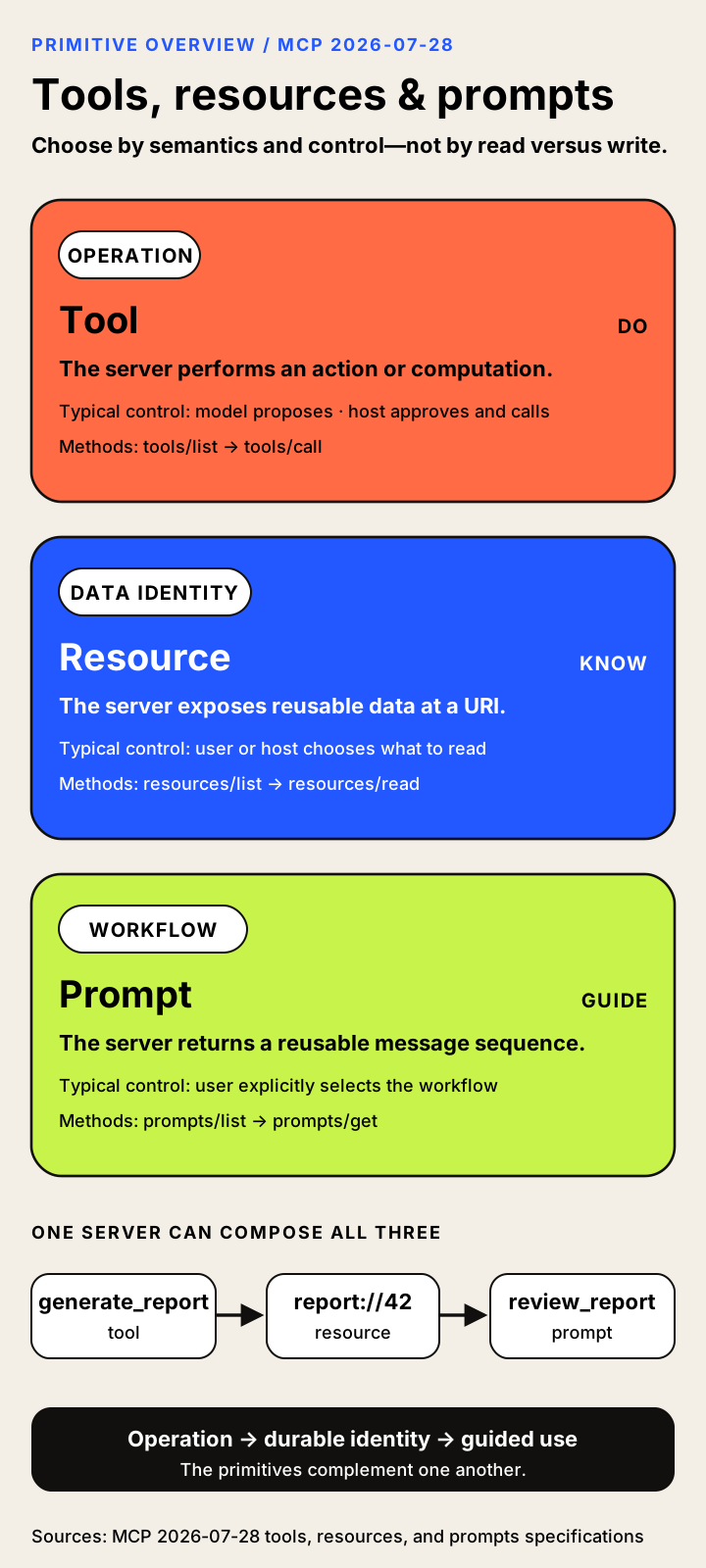
An MCP tool exposes an operation. An MCP resource exposes data identified by a URI. An MCP prompt exposes a reusable message template that the host can offer for user selection.
| Primitive | Use it for | Common interaction pattern |
|---|---|---|
| Tool | Search, calculate, query, create, or change something using supplied arguments. | A model proposes a call; the host mediates it. |
| Resource | Make a document, record, file, or other data object available under an addressable identity. | The application decides what to read or add to context. |
| Prompt | Prepare a repeatable interaction, such as a review or planning request. | A user selects a template through the host. |
These are intended interaction patterns, not permission grants. Product interfaces can differ. Sources: tools, resources, and prompts.
Where Skills fit
Skills over MCP distributes a SKILL.md instruction file and supporting files through Resources. A host with Skills support can discover the package and load its instructions when needed. Fetching the files alone does not load the skill. The Skills guide shows the file flow and an Inspector example; the extension specification defines the requirements. Extension status checked October 8, 2026.
Example: one documentation service, three useful interfaces
Consider a documentation service with three interfaces:
| Task | Interface | Why |
|---|---|---|
| Search the documentation for an error message. | Tool. | The caller supplies a query and asks the service to perform a search. |
| Read a particular, versioned reference document. | Resource. | The document has an identity that the application can revisit. |
| Begin a standard “explain this API change” review. | Prompt. | The server supplies reusable messages for an interaction the user chooses. |
A read-only operation can still be a tool. Searching documentation does not need to change the system, but it is still an operation with caller-selected arguments.
A single service can expose all three. A tool can point to a resource, and a prompt can incorporate resource content. Selecting a prompt does not itself grant permission to perform later actions.
For responsibility boundaries, read MCP host vs client vs server. For method and schema details, continue to the full comparison below.
Choose in 30 seconds: a decision framework
| Ask in order | If yes | Why |
|---|---|---|
| Must the server compute, search, filter, mutate, or act on runtime arguments? | Tool | The primary object is an operation. |
| Is the primary object reusable data with a meaningful URI? | Resource | The primary value is durable data identity. |
| Does an operation discover or create durable data? | Use both | Let the tool perform the work and return or link the resource. |
Start with four questions.
1. Is the primary object an operation?
If the model or application supplies runtime arguments and expects the server to perform work, choose a tool.
Examples:
- search;
- calculate;
- query;
- mutate;
- send;
- deploy;
- generate;
- transform;
- start a job;
- capture a screenshot.
2. Is the primary object reusable data with an identity?
If the host should be able to refer to, display, cache, re-read, or monitor the data independently of one operation, choose a resource.
Examples:
- a file;
- an issue;
- a record;
- a report;
- a schema;
- a screenshot;
- a document;
- an incident timeline;
- a knowledge graph;
- a generated artifact.
3. Should the user explicitly launch a reusable interaction?
If the server is packaging domain guidance into a message sequence that the user selects, choose a prompt.
Examples:
- review a pull request;
- start incident triage;
- prepare a migration plan;
- draft a customer brief;
- run a compliance checklist;
- explain a report using a standard method.
4. Does the requirement cross boundaries?
Use complementary primitives.
Tool discovers or creates object
        ↓
Resource gives object durable identity
        ↓
Prompt tells the user/model how to work with it
Refined decision criteria
| Criterion | Favors tool | Favors resource | Favors prompt |
|---|---|---|---|
| Model should choose runtime arguments | Strongly | Sometimes | Weakly |
| Durable URI identity | Weakly | Strongly | Weakly |
| Side effects | Strongly | Against | Against retrieval itself |
| User explicitly launches workflow | Sometimes | Sometimes | Strongly |
| Reusable across conversations | Sometimes | Strongly | Strongly |
| Cacheable data object | Weakly | Strongly | Weakly |
| Needs structured operation validation | Strongly | URI validation | Argument validation |
| Needs context-picker UI | Weakly | Strongly | Weakly |
| Needs slash-command/menu UI | Weakly | Sometimes | Strongly |
| Needs update notifications | Catalog only | Strongly | Catalog only |
| Host support is tools-only | Practical pressure | May require fallback | May require fallback |
| Should appear in model tool catalog | Strongly | No by default | No by default |
A fallback strategy for uneven hosts
A server publisher may maintain a rich canonical design while offering compatibility tools:
- canonical resource:
docs://sdk/authentication; - compatibility tool:
read_docs(uri); - canonical prompt:
review_security_change; - compatibility tool:
get_review_prompt(arguments)only when a host cannot display prompts.
This can broaden compatibility, but the server should document which interface is canonical and avoid inconsistent authorization or results.
How each primitive works
The methods and schemas below describe the protocol surface. The MCP vs function calling guide explains how a host may translate a model's native tool proposal into an MCP tools/call request.
MCP tools
A tool is a server-published operation that an MCP client can discover with tools/list and invoke with tools/call. In the current specification, a tool definition can include a name, human-readable title and description, icons, an input schema, an optional output schema, and annotations. [S123]
Tool discovery
A host or client obtains the available tool catalog through tools/list. The list is pageable. Under 2026-07-28, complete list results contain cache information—ttlMs and cacheScope—so compatible clients and intermediaries can avoid repeatedly downloading identical catalogs while respecting authorization context. The current revision also requires deterministic tool ordering, which helps clients compare catalogs and produce stable user interfaces. [S123] [S055]
Tool discovery is not the same as automatic model exposure. The host may:
- hide tools the user has not approved;
- exclude tools unsupported by the selected model;
- rewrite or namespace tool names to avoid collisions;
- reduce a large catalog through search or lazy loading;
- block write-capable tools in a read-only mode;
- expose tools only to a human-operated palette;
- translate MCP schemas into a provider-specific function-calling format.
The server publishes the capability. The host determines which audience receives it.
Tool input schemas
Every tool has an inputSchema expressed as JSON Schema. If no dialect is explicitly identified, current MCP defaults to JSON Schema Draft 2020-12. The schema can describe required properties, types, enums, arrays, nested objects, and other supported constraints. [S123] [S181]
Schema validity is only the first layer of validation. A call may be structurally valid yet semantically unsafe:
- a valid path may escape an approved directory;
- a valid repository name may belong to another organization;
- a valid SQL string may contain a write statement;
- a valid recipient address may be unintended;
- a valid amount may exceed a user’s authority;
- a valid cloud-resource identifier may belong to another tenant.
The server and underlying system must enforce object-level authorization, business rules, and least privilege. The model and host cannot infer those controls from JSON Schema alone.
Calling a tool
A client sends tools/call with the tool name and arguments. The server returns either a complete result, an error, or—under current MCP—an input_required result used by the Multi Round-Trip Requests pattern. An input-required result lets the outer request pause while the host gathers elicitation or other client input, then retry the request with the supplied responses and request state. This replaces the earlier reliance on server-initiated requests during a stateful connection. [S123] [S055] [S058]
The model does not ordinarily send the JSON-RPC request itself. A typical flow is:
1. Server publishes tool.
2. Client lists tool.
3. Host filters and converts definition.
4. Model proposes a native tool/function call.
5. Host applies permission policy.
6. MCP client sends tools/call.
7. Server executes or delegates the operation.
8. Host validates and presents the result.
9. Host may return the result to the model.
A host can also call a tool programmatically without using a model.
Tool results
Current tool results can contain several content block types:
- text;
- images;
- audio;
- resource links;
- embedded resources.
A result may additionally include structuredContent, normally paired with an outputSchema. Structured content helps hosts validate responses, build tables or forms, pass data to downstream automation, and avoid reparsing prose. It is not the same thing as a model provider’s “structured output”: the MCP server produces it after executing the tool. [S123] [S043]
A resource link points to separately addressable data. An embedded resource carries resource content inside the tool result. This makes the boundary between primitives compositional rather than absolute: a tool can create a report and return a link to the report resource, or return a small resource inline for immediate use.
Tool errors
MCP distinguishes protocol-level failures from errors produced while executing a valid tool request. A malformed JSON-RPC message, unsupported method, or invalid protocol envelope is not the same as a tool that ran and failed. Tool execution errors can be represented in the tool result so the model or user can see domain-relevant information and potentially correct the call. [S123]
Hosts should not indiscriminately send sensitive internal exception details back to models. Servers should provide enough information to support correction while protecting credentials, stack traces, tenant identifiers, and internal topology.
Tool annotations
Tool annotations appeared in the 2025-03-26 revision. They include hints such as:
- read-only;
- destructive;
- idempotent;
- open-world interaction.
These are descriptive hints, not security guarantees. A malicious server can lie, and a well-intentioned implementation can be wrong. A host may use annotations to improve confirmation language or policy, but it should trust them only when it trusts the server and publisher. [S036] [S123] [S134]
MCP resources
A resource is data identified by a URI and exposed by an MCP server for application-managed use. A server can list concrete resources, describe resource templates, read resource contents, and notify subscribed clients about changes. [S124]
Resources are not limited to operating-system files. A URI can identify:
- a source file;
- a database schema;
- a customer record;
- a repository issue;
- an incident timeline;
- an image or screenshot;
- an API reference page;
- a log snapshot;
- a generated report;
- a knowledge-graph view;
- a virtual object assembled from several systems.
The URI is an identifier. It need not correspond to a public web URL or physical disk path. Servers may define custom schemes such as memory:, issue:, db:, or docs: so long as clients and hosts handle them safely. [S124] [S311]
Listing resources
A client uses resources/list to obtain concrete resources available to the current caller. The response can be paginated and, in current MCP, carries cache information. Because authorization can change the visible set, clients must respect the result’s cache scope and avoid sharing one user’s resource catalog with another. [S124] [S055]
A resource descriptor may contain:
- URI;
- name;
- title;
- description;
- icons;
- MIME type;
- estimated size;
- annotations.
The descriptor is metadata, not the content itself. This separation lets a host display a picker, estimate context cost, filter by type, and defer loading until the resource is needed.
Resource listings do not have to enumerate an entire underlying system. A server may expose only curated resources, only objects the user can access, or only high-value entry points. A host should not assume resources/list is a complete index of every readable URI.
Reading a resource
A client sends resources/read with a URI. The result contains one or more text or binary representations, each with the URI, optional MIME type, and content. Current read results are cacheable according to server-provided hints. Some current flows can also return input_required when additional interaction is necessary. [S124] [S055]
The fact that a resource is “read” does not eliminate security obligations. The server must verify that:
- the caller may access the object;
- the URI belongs to the correct tenant;
- file paths remain inside allowed roots;
- redirects and remote fetches are safe;
- the MIME type matches the representation;
- binary data is size-limited;
- secrets are not exposed through error messages;
- a cached response is not reused across authorization contexts.
The host must treat the content as untrusted input. A document, webpage, issue body, log entry, or database field can contain instructions aimed at the model. Loading a resource into context is a data-flow decision, not a statement that the content is safe. [S134] [S108]
Application-driven does not mean invisible to users or models
The specification describes resources as application-driven because the host controls listing, reading, selection, attachment, caching, and context insertion. That does not mean the user cannot select one or the model cannot influence the decision.
Examples include:
- a user choosing a resource from a context picker;
- a model suggesting that a specific issue should be attached;
- a host automatically loading a project manifest;
- a prompt embedding a resource;
- a tool returning a resource link that the host decides to follow;
- a policy engine refusing to load a sensitive document.
The defining feature is that resource access is mediated by application behavior around a URI-addressable data object, rather than represented as a free-standing model operation.
Stable identity is the central advantage
Suppose a search tool returns a 30-page report. If the report exists only as text inside one tool result, later references are awkward. If the server also exposes report://research/7f02, the host can:
- display the report by title;
- attach it later without repeating the search;
- cache it;
- monitor updates;
- link to it from another tool result;
- embed it in a prompt;
- retain provenance.
A resource turns “some bytes returned once” into a first-class data object.
Resource templates
A resource template defines a family of resources through a parameterized URI rather than listing every concrete item. MCP uses URI-template concepts associated with RFC 6570. [S124] [S312]
Examples:
issue://{owner}/{repository}/{number}
customer://{account_id}
docs://{product}/{version}/{path}
db://{database}/schema/{table}
log://{service}/{date}
A client obtains templates through resources/templates/list. A template descriptor can include the URI template, name, title, description, MIME type, icons, and annotations. Current template-list results are pageable and cacheable. [S124] [S055]
Template versus tool schema
A resource template and a tool schema may both contain variable-looking fields, but they answer different questions:
- A resource template says, “These parameter values identify a data object.”
- A tool schema says, “These arguments instruct the server to perform an operation.”
issue://acme/api/123 identifies one issue. search_issues(query, labels, sort) asks the server to compute a result set. The issue could be a resource even if the search is a tool.
Completion and discoverability
Templates become more usable when the host can help users fill their variables. MCP completion capabilities can provide contextual suggestions for prompt arguments or resource-template variables. A host may also use its own knowledge—such as the current repository—to prefill values. [S036] [S124]
Completion does not authorize access. A server must still verify the expanded URI at read time. It should not leak names of inaccessible repositories, accounts, or records through completion suggestions.
When not to use a resource template
A template is a poor fit when:
- resolving it performs a mutation;
- the output is fundamentally a computed search with no durable identity;
- variable combinations are unbounded and expensive to enumerate safely;
- the host cannot meaningfully present or complete the URI;
- access depends on complex arguments that are clearer as a tool schema;
- the result is ephemeral and useful only within one operation.
A template is strongest when the variables identify an object that users and applications can refer to again.
MCP prompts
An MCP prompt is a server-defined template that returns one or more messages when a client calls prompts/get. Prompts are intended to be user-controlled: the host surfaces them, the user selects one, arguments are supplied, and the returned messages enter the interaction. [S125]
A prompt definition can contain:
- name;
- title;
- description;
- icons;
- named arguments;
- whether each argument is required.
A prompt result can contain user and assistant messages with text, images, audio, resource links, or embedded resources. This allows a prompt to package not merely a sentence but a structured starting state for a conversation. [S125]
Prompts are not system prompts
An MCP prompt is not automatically the model’s hidden system instruction. It is a protocol-exposed message template. The host decides where and how the returned messages enter the conversation.
A system prompt is typically controlled by the host or application and sets high-priority behavior for the model. An MCP prompt is normally selected by a user from a server-provided catalog. The server cannot assume its prompt overrides host policy, system instructions, or safety controls.
The distinction matters for security and product design. Calling a template “system” inside its text does not grant it system-level authority. A trustworthy host should preserve message-role semantics and avoid silently elevating server-authored content.
Prompts are not tools
prompts/get returns messages. It does not itself send an email, modify a database, create a deployment, or complete every step described in those messages. The model may later call tools, and the host may request confirmation, but that is a separate phase.
Consider a release_checklist prompt. It may return messages that ask the model to:
- inspect recent commits;
- review test results;
- identify breaking changes;
- draft release notes;
- ask the user before publishing.
The prompt starts and structures the workflow. The tools perform the repository, test, and publication operations.
Prompt arguments
Prompt arguments are named inputs used to render the message sequence. They are not identical to a tool’s JSON Schema. SDKs may provide typed conveniences, but the protocol’s prompt argument model is intentionally focused on template inputs. [S125] [S292] [S295]
Examples:
prompt: review_pull_request
arguments:
  repository = acme/api
  number = 412
  focus = security
The server might return a user message instructing the model to review the pull request, plus an embedded resource containing the diff or a link to an issue resource.
Who controls each primitive?
The familiar labels describe intended interaction patterns. The client, server, and host architecture guide explains why the host remains the presentation, policy, and permission boundary in every case.
The three labels—model-controlled, application-driven, and user-controlled—are useful only when the host’s mediation is visible.
| Decision | User | Host | Model | Server |
|---|---|---|---|---|
| Publish a tool | No | No | No | Yes |
| Reveal a tool to the model | May influence | Yes | No | No |
| Propose a tool call | Through intent | Mediates | Often | No |
| Confirm a sensitive call | Often | Enforces UI/policy | No | No |
| Execute or delegate a tool | No | Routes | No | Yes |
| Publish a resource | No | No | No | Yes |
| List/read a resource | May request | Yes | May suggest | Responds |
| Insert resource into model context | May request | Yes | Consumes | No |
| Publish a prompt | No | No | No | Yes |
| Select a prompt | Yes | Surfaces it | No | No |
| Render prompt arguments and messages | Supplies inputs | Yes | Consumes messages | Produces template result |
| Enforce underlying object authorization | No | Cannot substitute | No | Server/system |
The host is the policy and translation boundary in all three cases. The model can propose; the server can publish and execute; the user can choose; but the host decides what is visible, what is sent, and how the result is incorporated.
Control labels are defaults, not permissions
“Model-controlled” does not mean the model has independent credentials or unreviewed authority. A host can require approval for every call.
“Application-driven” does not mean the model can never cause a resource to be read. A host might implement a model-visible resource-search tool or automatically load a resource referenced in a tool result.
“User-controlled” does not mean the user authored or audited a prompt. It means selection is expected to be explicit. The server authors the template, and the host decides how transparently to present it.
Pairwise decisions
The three labels become useful when they resolve an actual design choice. Read versus write is only one clue; runtime operation, durable identity, and workflow intent are stronger tests.
Tool vs resource
The hardest design choice is often not tool versus prompt but tool versus resource, because both can return data.
A misleading rule says:
Use a resource for reads and a tool for writes.
That rule fails as soon as the read is dynamic. Web search, SQL querying, log filtering, geocoding, code search, and analytics aggregation are commonly read-only operations, yet they are well represented as tools because the model supplies runtime arguments and asks the server to compute a result.
A better question is:
Is the primary thing an operation chosen at runtime, or a data object with a durable identity?
Use a tool when
- the model must formulate a query;
- arguments control computation, filtering, sorting, or transformation;
- the operation may create or modify state;
- the result is ephemeral or specific to one request;
- the operation should appear in the model’s action catalog;
- the host needs a confirmation step;
- the server must validate complex structured inputs;
- the same operation can produce many unrelated results.
Use a resource when
- the data has a stable URI;
- the host or user should select it from a browser or context picker;
- the data may be reused across conversations or tool calls;
- MIME type, size, title, and provenance matter;
- the object should be cached or monitored for updates;
- another tool or prompt should be able to link to it;
- the data can be identified without describing an operation.
Use both when
The model may need a tool to discover, create, or transform an object, after which the object should exist as a resource.
Examples:
| Scenario | Tool | Resource |
|---|---|---|
| Documentation | search_docs(query) |
docs://product/version/page |
| Incident analysis | search_logs(filter, window) |
incident://123/timeline |
| Reports | generate_report(parameters) |
report://job/7f02 |
| GitHub | search_issues(query) |
issue://owner/repo/123 |
| Database | run_read_query(sql) |
db://warehouse/schema/orders |
| Browser | capture_screenshot(url) |
screenshot://run/481 |
| CRM | find_customers(criteria) |
customer://account/8841 |
This composition preserves model autonomy for dynamic work and application control for durable context.
Read-only tools are legitimate
The existence of resources does not make read-only tools an error. A search tool or query tool can be the cleanest interface when:
- the address of the desired data is unknown;
- the user describes a semantic criterion rather than a URI;
- the server must rank, aggregate, or transform results;
- the result should be scoped and summarized;
- the host does not provide rich resource browsing.
Tool annotations can signal read-only intent, but hosts must treat that as untrusted metadata unless the server is trusted. [S123]
Resources should not hide effects
A resources/read implementation should not silently send an email, create a billing record, rotate a key, or acknowledge an alert. Such behavior defeats the host’s ability to reason about the primitive and can bypass confirmation. If reading necessarily performs an effect—such as consuming a one-time secret—the server should document the semantics carefully and may need to model the action as a tool.
Tool vs prompt
A tool gives the model or application a callable operation. A prompt gives the user a reusable way to initiate a conversation or workflow.
| Question | Tool | Prompt |
|---|---|---|
| What is selected? | Operation | Message template |
| Typical selector | Model through host | User through host |
| Inputs | JSON Schema arguments | Named template arguments |
| Immediate output | Operation result | Message sequence |
| Side effects | Possible | Retrieval should not itself perform the workflow’s effects |
| Main interface | Tool catalog | Slash command/menu |
| Can lead to the other? | Tool result may suggest workflow | Prompt may lead model to call tools |
Choose a tool when the server must perform the work
“Create a release,” “search the logs,” “run the test suite,” and “open a ticket” are operations. Their success depends on execution, authorization, and result handling. They belong as tools even when a prompt helps the user formulate the request.
Choose a prompt when the server packages domain procedure
“Start an incident review,” “review a pull request using our security checklist,” and “prepare a customer renewal brief” describe interaction patterns. The prompt may specify questions, message roles, expected evidence, and sequencing. It can ask the model to use resources and tools without being the executor itself.
A prompt is not a macro with hidden authority
A host should not treat a prompt as pre-approval for every tool call it might induce. Selecting deploy_release as a prompt does not necessarily authorize production deployment. The subsequent tool call still needs policy and server-side authorization.
Prompts can improve predictability by making intent visible, but they can also conceal complexity if the host shows only a friendly title. Good hosts expose descriptions, arguments, server provenance, and the generated messages before high-risk workflows proceed.
Resource vs prompt
Resources and prompts can both appear in a user-facing picker and both can add content to a conversation, but their identities differ.
A resource is the data. A prompt is a template for messages about what to do with data or how to begin an interaction.
Examples:
| Resource | Related prompt |
|---|---|
pr://acme/api/412 |
review_pull_request |
incident://payments/2026-08-14 |
prepare_postmortem |
customer://8841 |
draft_renewal_brief |
schema://warehouse/orders |
analyze_query_plan |
docs://sdk/2.0/migration |
plan_sdk_upgrade |
The prompt may embed or link to the resource. The resource remains reusable outside that prompt.
Do not use prompts as document storage
A prompt that contains an entire frequently changing manual is hard to cache, inspect, reuse, and update safely. The manual should normally be a resource. The prompt can reference the manual and instruct the model how to use it.
Do not use resources as disguised workflows
A resource called workflow://deploy-production that contains instructions may be readable, but it does not gain prompt semantics merely because its content is instructional. If the user should explicitly launch a standardized interaction, expose a prompt. If the model should execute a deployment operation, expose a tool. The same server may expose all three.
Compose primitives without duplicating semantics
| Step | Primitive | Responsibility | Example |
|---|---|---|---|
| 1 | Tool | Perform work with runtime arguments | generate_report |
| 2 | Resource | Give the artifact a reusable identity | report://quarterly/2026-q3 |
| 3 | Prompt | Let the user start a repeatable review | review_quarterly_report |
Yes. The protocol primitives are composable views over an underlying domain.
Consider a source-control server:
| Requirement | Best primitive | Why |
|---|---|---|
| Search issues by semantic query | Tool | Dynamic model-generated operation |
| Read issue 123 | Resource | Durable identity and reusable context |
| Create an issue | Tool | Mutation with authorization and confirmation |
| Read repository README | Resource | Addressable document |
| Generate a release-note draft | Prompt | User-selected interaction template |
| Review a pull request | Prompt + resources + tools | Template structures work; resources provide diff; tools fetch checks or post comments |
| Produce a report and store it | Tool returning resource link | Operation creates durable artifact |
This is not duplication for its own sake. Each representation serves a different interaction.
Avoid accidental semantic forks
Exposing the same operation through multiple primitives can create inconsistencies. If read_issue is both a tool and a resource, clarify:
- whether both return the same fields;
- whether authorization is identical;
- whether one is summarized and the other complete;
- whether caching applies;
- whether updates are signaled;
- which interface should be preferred.
A tool that returns a resource link can often avoid duplicate data contracts: the tool performs discovery or creation, while the resource becomes the canonical representation.
Host support is not one Boolean
The protocol specification defines the primitives; products decide which ones to expose and how to present them. The current specification is 2026-07-28, but SDK defaults, deployed servers, compatibility modes, plans, and host interfaces can adopt it at different speeds. Treat every product row as a dated documentation snapshot, not a certification. [S292]
The maintained MCP host compatibility guide tracks product and transport caveats separately from this primitive-selection guide.
| Product or integration | Tools | Resources | Prompts | Important scope | Sources |
|---|---|---|---|---|---|
| MCP Inspector | Yes | Yes | Yes | Developer testing surface, not an end-user host guarantee. | S297 S298 |
| VS Code | Yes | Yes | Yes | Product UI and behavior still vary by mode and release. | S142 S141 |
| Gemini CLI | Yes | Yes | Yes | CLI documentation establishes these surfaces; transport and trust settings still matter. | S144 |
| Claude custom remote connectors | Yes | Not independently established as a core connector UI | Not independently established as a core connector UI | Do not generalize behavior from Claude Code or local Desktop integrations. | S145 |
| Zed | Yes | Not independently established | Yes | Tools and prompts are documented; absence of resource evidence is not proof of impossibility. | S284 |
| OpenAI Agents SDK | Programmatic support | Programmatic support | Programmatic support | Hosted/model tool-import paths are narrower and must not be conflated with the SDK's programmatic MCP clients. | S090 |
Security changes with the primitive
Primitive choice does not replace authentication, authorization, validation, provenance, or host policy. It changes where risk concentrates:
- Tools concentrate authority and side-effect risk. Names, descriptions, schemas, and annotations are untrusted metadata; the server and underlying service must enforce the real authorization and business rules.
- Resources concentrate disclosure, URI, cache-isolation, and prompt-injection risk. A resource is not trusted merely because it arrived through MCP.
- Prompts concentrate instruction-provenance and workflow risk. Retrieving a prompt does not elevate it to a system instruction or pre-authorize later tool calls.
The host still decides what reaches the model and user, while the server remains responsible for safe execution and data access. The MCP security guide expands these boundaries into deployable controls. When a tool links to a server-supplied interactive interface, the MCP Apps guide explains the ui:// resource, sandbox, host permissions and fallback behavior. [S123] [S124] [S125] [S134] [S108]
What changed in MCP 2026
The primitive meanings survived the 2026-07-28 revision, but several surrounding mechanics changed. Present-tense implementations must distinguish the released specification from older session-era tutorials:
- requests are self-describing rather than beginning with the legacy initialization and protocol-session lifecycle;
- list and resource-read results can carry explicit cache information;
- additional input can use Multi Round-Trip Request result types;
- requested streams through
subscriptions/listenreplace the old resource-specificresources/subscribeflow; - discovery, routing metadata, and result types are explicit parts of the current architecture.
Those statements describe the current specification, not universal deployment. SDKs, servers, and hosts can retain compatibility paths or lag the release. Read the MCP protocol versions and compatibility guide, annotated 2026-07-28 change guide, transport guide, and primary-source history before copying an older message flow. [S055] [S121] [S058]
Two representative designs
These examples are intentionally different: one centers on dynamic computation and durable definitions; the other combines evidence, workflow, and high-authority actions.
Database and analytics
Tools
- run a read-only query;
- explain a query plan;
- calculate a metric;
- start an approved migration;
- cancel a long query.
Resources
- database schema;
- table definition;
- saved query;
- materialized report;
- data dictionary;
- lineage record.
Prompts
- analyze query performance;
- produce a data-quality review;
- design a migration plan;
- explain a dashboard anomaly.
A database schema is a natural resource. A generated SQL query remains a tool call even when read-only, because the model chooses runtime arguments and the server executes computation.
Incident response
Tools
- search logs;
- query traces;
- page an on-call engineer;
- change feature flags;
- create a ticket;
- run a diagnostic.
Resources
- incident timeline;
- alert;
- log bundle;
- dashboard snapshot;
- runbook;
- postmortem draft.
Prompts
- start triage;
- prepare handoff;
- draft status update;
- conduct postmortem review.
Incident response is a compelling combined pattern: prompts structure the process, resources preserve evidence, and tools perform investigation or remediation.
Frequently asked questions
What are MCP tools, resources, and prompts?
They are three server-side primitives: operations, URI-addressable data, and reusable message templates.
What is the main difference between an MCP tool and resource?
A tool represents an operation; a resource represents data with a durable URI identity.
What is the main difference between a tool and prompt?
A tool executes or delegates work; a prompt returns messages that may lead to later work.
Can one server expose all three?
No. Expose the capabilities the server actually implements and that its intended hosts can use. Do not add a resource or prompt solely to fill out a checklist.
Can a tool be read-only?
Yes.
What is a resource template?
A parameterized URI definition for a family of resources.
What happened to resources/subscribe?
It is a legacy method; current MCP uses subscriptions/listen with resource filters.
Do all hosts support prompts?
No.
Does choosing a prompt approve tool calls?
No.
What is the best design rule?
Use tools for operations, resources for durable data identity, prompts for explicitly selected reusable interactions, and combine them when needed.
Conclusion
Use the broad comparison as a design tool, then verify the exact target hosts and protocol versions before implementation.
MCP tools, resources, and prompts are not interchangeable wrappers around APIs. They encode three different relationships:
- Tools expose operations that a host can make available for model-mediated or programmatic invocation.
- Resources expose data objects with URI identity, metadata, caching, and update semantics.
- Prompts expose server-authored message templates that users can explicitly select through a host.
The best server designs do not ask only, “Can this be implemented as a tool?” They ask:
- Who should control the interaction?
- Is the primary object an operation, a data identity, or a reusable conversation pattern?
- Does the result need to be reused, linked, cached, or monitored?
- Will the target hosts expose the primitive well?
- What authority, data, and instruction risks does the primitive introduce?
- Would complementary primitives provide a clearer architecture?
The three original primitives survived because each preserves information the others do not. Tools preserve operation semantics. Resources preserve data identity. Prompts preserve user-selected workflow intent. Current MCP adds stateless requests, caching, MRTR, routing, and requested subscriptions around those durable concepts, but it does not erase their separation.
A practical rule remains:
Use a tool to do work.
Use a resource to identify and load data.
Use a prompt to let the user start a repeatable interaction.
Use more than one when the domain genuinely crosses those boundaries.
Sources, downloads, and update policy
The protocol explanations use MCP 2026-07-28. Host features and SDK behavior are dated separately because they can change independently of the specification.
Show all 41 evidence records used by the source article
S123 S124 S125 S055 S121 S058 S134 S181 S043 S036 S311 S108 S312 S292 S295 S142 S145 S144 S307 S274 S284 S140 S301 S302 S303 S299 S297 S298 S141 S259 S175 S090 S249 S028 S029 S030 S026 S049 S127 S308 S309
See the source library and editorial policy for references and review dates.